Omnisend is an email and SMS marketing platform built for e-commerce: automations, campaigns, segments and forms, with native connectors to the main store platforms. Fullmetrix now connects to it officially.
Let us say it upfront: we love Omnisend. It is one of the best email and SMS marketing tools for e-commerce, its automations are solid, its editor is clean, and many of our customers use it every day. So this integration is not here to replace Omnisend. It is here to give it better ammunition.
Fullmetrix now connects officially to Omnisend. The idea is simple: you build your segments in Fullmetrix, with the full depth of our segmentation engine, then you push them to Omnisend in one click, as both segments and tags. Omnisend stays where you send your campaigns. Fullmetrix becomes where you decide, precisely, who receives them.
Why this integration
An email marketing tool only knows about your customers what your store hands over to it: an email, a first name, a country, a few order events. That is enough for simple segmentation, but it leaves an enormous amount of context on the table. And that context is exactly where your best audiences hide.
Fullmetrix, on the other hand, ingests all of your store data, far beyond the standard fields. We import WordPress roles, PrestaShop customer fields, data from your plugins, custom attributes from your theme, and we do exactly the same on Shopify, Magento and Sylius. That richness becomes a segmentation engine, and the output of that engine is what we push cleanly into Omnisend.
How the integration works
The connection is done through OAuth, in a few seconds, with no API key to copy and paste. Once Omnisend is connected to your Fullmetrix organisation, any segment or audience you create can be synced to Omnisend. The flow is deliberately simple.
- Connect Omnisend to Fullmetrix through the secure OAuth authorization button
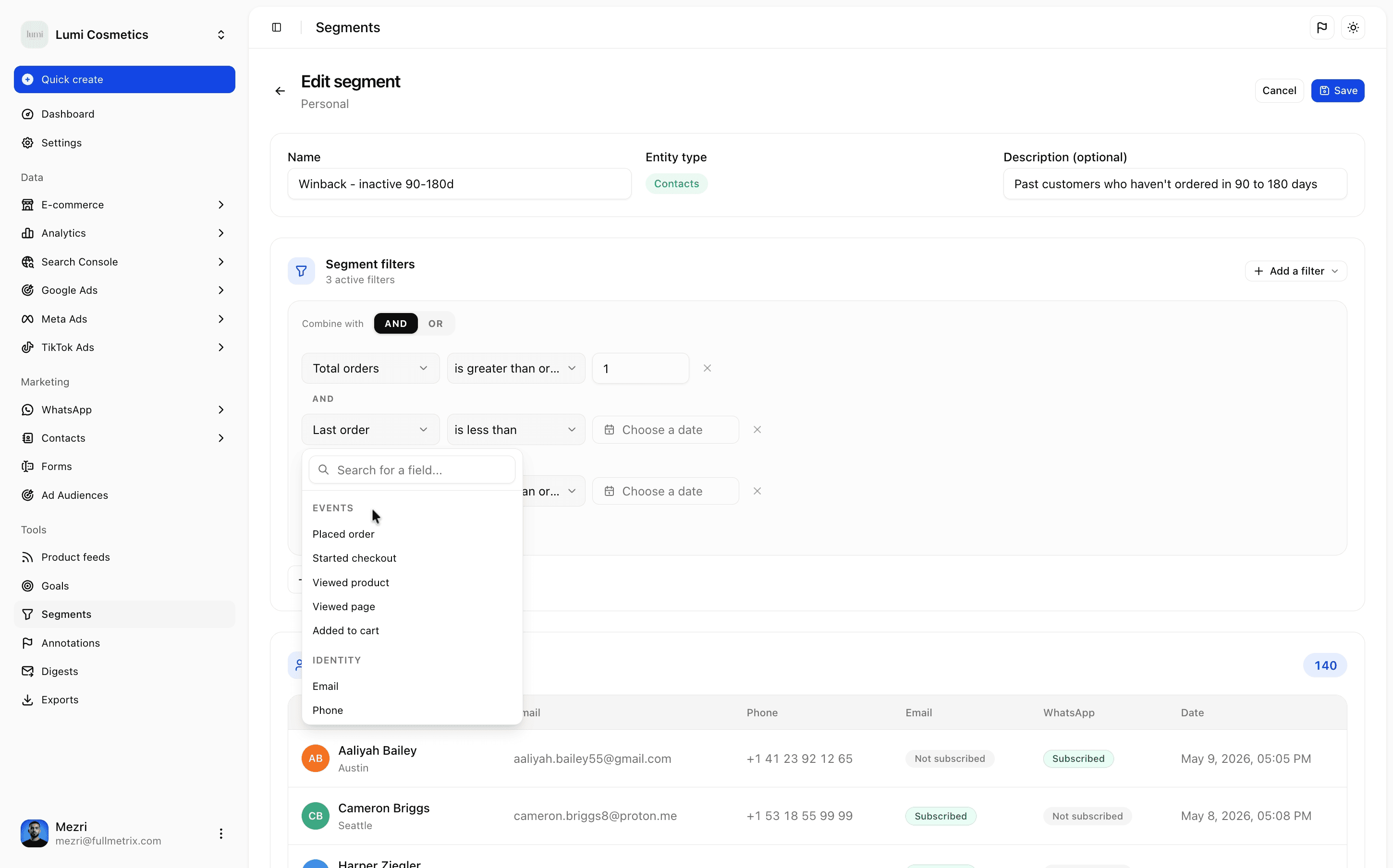
- Build your segment in Fullmetrix, on the fields of your choice
- Click Sync to Omnisend from the segment or the audience
- Fullmetrix creates a matching tag and segment on the Omnisend side
- The segment stays up to date: refresh the contacts whenever you want
On the Omnisend side, your contacts arrive with a dedicated tag in the form fullmetrix: segment name, and an Omnisend segment based on that tag is created automatically. You find your Fullmetrix audience directly inside Omnisend, ready to be targeted in a campaign or an automation, with no extra step.
Segments far richer than native ones
This is the heart of the integration. Where a classic connector only syncs email, first name and order status, Fullmetrix lets you segment on everything your store actually holds. Here are a few examples of what you can target that simply does not exist natively in an emailing tool.
Fields your platform hides
- WordPress roles and customer groups: segment your resellers, your VIPs, your B2B accounts
- PrestaShop customer fields and groups imported as they are, not just name and email
- Data from your e-commerce plugins: loyalty, subscriptions, referral, points
- Custom attributes from your theme and bespoke fields on your products
- The same everywhere on Shopify, Magento and Sylius: one segmentation logic across all
Purchase behaviour you control in detail
- Customers who bought a specific category or product, over a given period
- RFM segments, customer value, repeat frequency, average basket, margin
- Customers at risk of churn, or on the contrary ready for an upsell
- Fine combinations: VIPs of a category who have not ordered in 60 days
Tracking and engagement, not only orders
- Advanced visitor tracking: page views, viewed products, sessions, acquisition source
- Contacts captured through your Fullmetrix forms and pop-ups, with a unique promo code generated at sign-up
- Automatic contact enrichment as the data comes in
Segments AND tags, both on the Omnisend side
Many connectors stop at putting a tag on contacts, leaving you to rebuild the segment by hand inside the tool. Fullmetrix does both. We apply a dedicated tag to every contact in the segment, and we create the matching Omnisend segment based on that tag. So you get the object usable immediately, and the tag that lets you compose your own rules on top if you want to.
You stay in control of the sync
You choose which segments go to Omnisend and when to refresh them. A segment deleted on the Fullmetrix side can be cleanly removed on the Omnisend side. No rogue syncing: nothing leaves without you deciding it.
Under the hood
The integration relies on the official Omnisend API and respects its rules. Contacts are sent in batches, with their email and phone identifiers, first name, last name and country when available. Tags are normalised to stay readable and avoid collisions. The connection supports several Omnisend accounts per organisation, handy if you manage multiple brands.
- Official OAuth connection, no password or key to copy
- Contacts sent in batches through the Omnisend batch API
- Tags namespaced as fullmetrix: segment name, to stay clear inside Omnisend
- Multi-account Omnisend support per organisation
- Disconnect and revoke at any time from Fullmetrix
Availability and pricing
The Omnisend integration is available today, included in your Fullmetrix subscription, at no extra cost. If you already have an Omnisend account, the connection takes under a minute. Your existing Fullmetrix segments become instantly syncable.
Connect Omnisend to Fullmetrix
OAuth connection in under a minute, included in your subscription. Your segments go to Omnisend in one click.
Open FullmetrixGoing further
Omnisend joins the list of Fullmetrix destinations, alongside Meta Ads, Google Ads, TikTok and our other channels. The logic is always the same: you build the audience once, with the full depth of your e-commerce data, and you push it wherever you need it. One segmentation engine, several exit points.
If you do not have a Fullmetrix account yet, this is a good time. The trial is free, connecting your store takes a few minutes, and Omnisend plugs in right after.
Try Fullmetrix with Omnisend
Free Fullmetrix account, store connection in minutes, Omnisend integration included.
Start my trial